

Install
VS Code
Cursor
Windsurf
Antigravity
Open a project
Open a project or workspace folder in your IDE. Monk only activates when a workspace is open.
Sign in
The setup wizard appears automatically. Sign up or sign in — a browser page opens for authentication and redirects you back to the IDE when done.
Wait for dependencies
Monk installs its runtime dependencies automatically. This takes a minute or two.
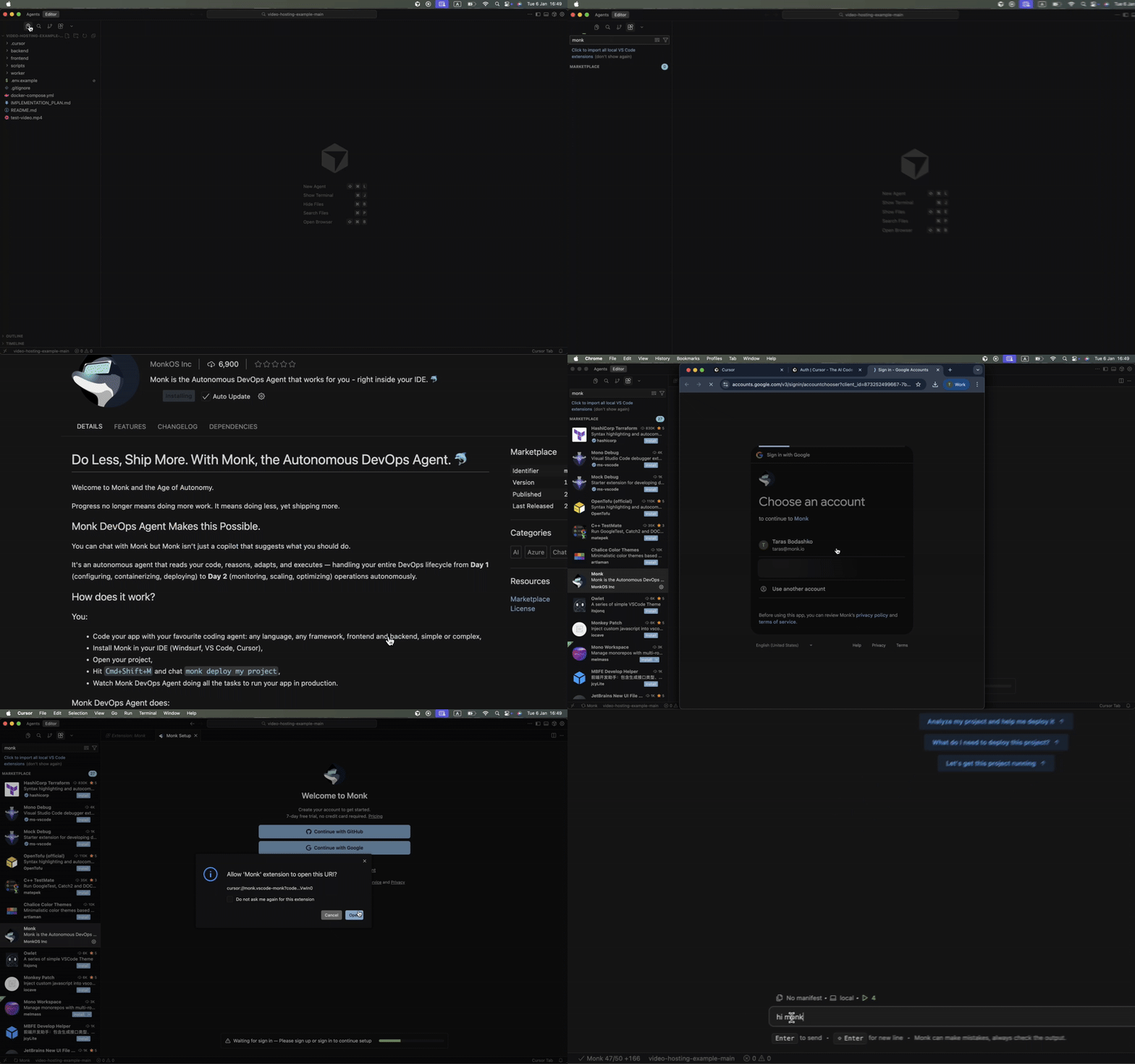
Open Monk
Click the Monk icon in your IDE’s status bar, or use the keyboard shortcut:- Mac:
Cmd+Shift+M - Windows/Linux:
Ctrl+Shift+M
Cmd+Shift+P / Ctrl+Shift+P).
System Requirements
Monk works on macOS (Intel and Apple Silicon), Windows 10+, and most Linux distributions. No additional dependencies needed — Monk installs everything automatically.Coming soon: Headless mode — no IDE required. Plug Monk directly into Claude Code, Codex, Gemini CLI, or any other CLI agent. Upvote it on our roadmap.
Next Steps
Connect your agent
Use Monk from Claude Code, Gemini, Codex, Cursor, and other coding agents
First deployment
Deploy your first application in minutes
Having trouble?
Common installation issues and how to fix them